

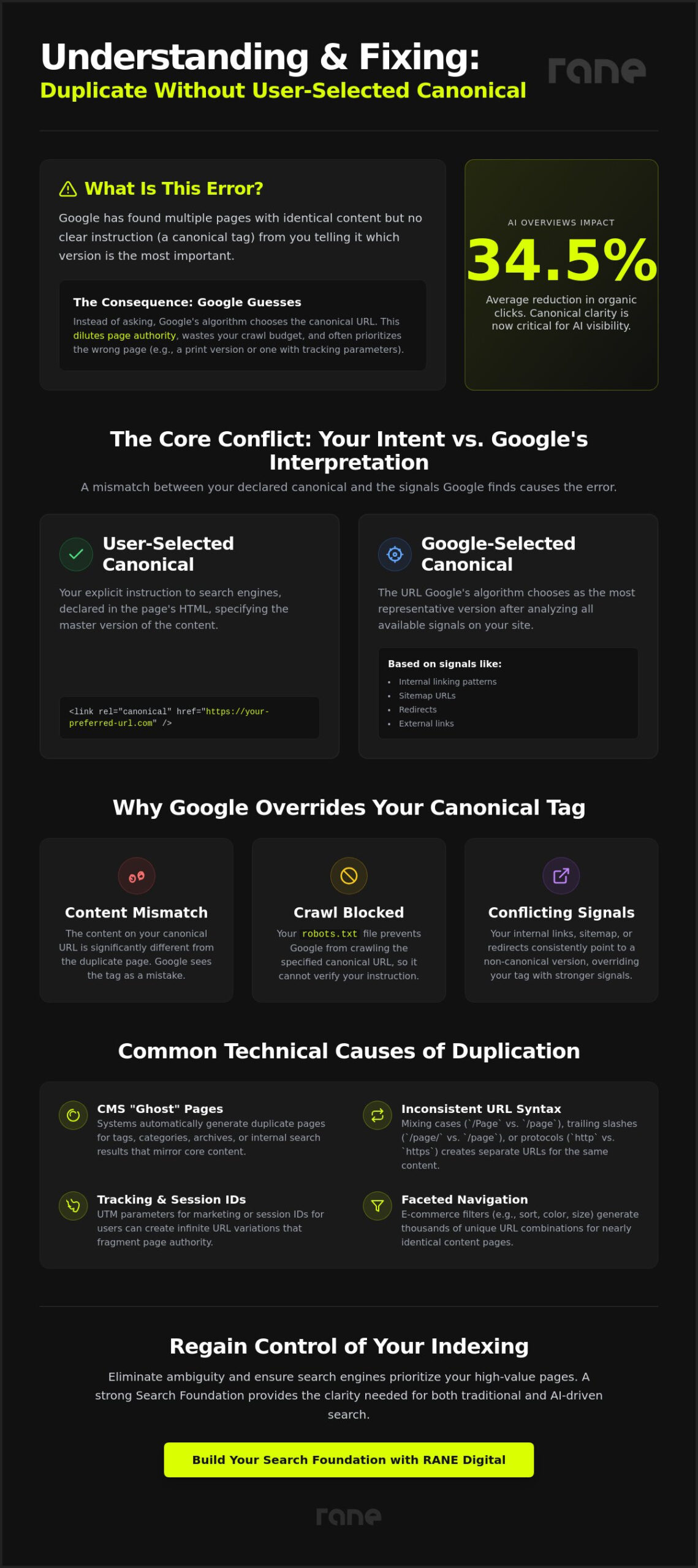
A single URL ambiguity can quietly dismantle your search foundation. When Google encounters a duplicate without user-selected canonical error, it stops asking which page you prefer and starts guessing. This indecision doesn’t just waste your crawl budget; it actively dilutes your page authority across multiple URL variations. With AI Overviews now reducing organic clicks on top results by an average of 34.5%, you can’t afford to let search engines choose the wrong version of your content.
You likely feel the frustration of seeing your best assets sidelined by Google-selected canonicals that don’t align with your strategic goals. We’re going to fix that. This article provides a clear framework to eliminate indexing ambiguity and ensure search engines prioritise your high-value pages through intentional technical signals. We will examine how to clean your Index Coverage report, consolidate ranking signals, and secure your visibility in an era where AI crawlers demand singular, high-intent data.
Key Takeaways
- Identify why Google excludes pages from the index when it detects a duplicate without user-selected canonical and learn to interpret the technical triggers causing this state.
- Uncover the common CMS configurations and URL variations that create ‘ghost’ duplicates, allowing you to stop crawl budget wastage at the source.
- Understand how canonical clarity directly influences your visibility in generative search results by providing AI crawlers with a single, authoritative source to cite.
- Master a step-by-step resolution workflow using the URL Inspection tool to reconcile your preferred URLs with Google’s indexed version.
- Learn to architect a scalable site structure through demand mapping, ensuring every page serves a unique intent and prevents future indexing conflicts.
What is the ‘Duplicate Without User-Selected Canonical’ error?
The duplicate without user-selected canonical error occurs when Google identifies multiple URLs with identical or near-identical content but finds no clear signal from the site owner indicating the preferred version. This status, visible within the ‘Page Indexing’ report of Google Search Console, represents a state of technical limbo. To maintain a lean and relevant index, Google excludes these duplicate pages from search results. It’s a protective measure against redundancy, yet it frequently results in the wrong version of a page being surfaced to users.
When this error appears, Google doesn’t simply ignore the duplication. It takes control of the process. The algorithm “guesses” which URL should be the primary version based on various signals, such as sitemaps and internal links. This automated choice often fails to align with your commercial intent, leading to situations where tracking URLs or print-friendly versions of a page outrank your primary landing pages. Resolving this requires a deliberate SEO foundation that removes ambiguity before the algorithm makes its own determination.
The difference between user-selected and Google-selected canonicals
A user-selected canonical is the specific URL you define within the Canonical link element in your page’s HTML. It’s your explicit instruction to search engines. Conversely, a Google-selected canonical is the URL the algorithm deems most representative of the content after evaluating all available signals. A discrepancy between these two is a clear indicator of structural weakness. It suggests that your technical implementation and your site’s actual behaviour are in conflict, forcing Google to override your stated preference in favour of its own data.
Why Google ignores your existing canonical tags
Content mismatch remains the most frequent reason Google overrides a user-selected signal. If the page you’ve designated as the canonical version differs significantly in substance from the duplicate, the algorithm will treat the tag as a suggestion rather than a directive. Technical barriers also play a significant role. If your robots.txt file blocks Google from crawling the designated canonical URL, the algorithm can’t verify the tag and will search for an alternative version to index.
Internal linking patterns often provide the final push for Google to ignore your tags. If your site architecture consistently points users toward a URL variation that differs from your canonical tag, Google interprets those links as a stronger signal of intent. This inconsistency creates a duplicate without user-selected canonical state because the algorithm no longer trusts your technical instructions. Aligning these signals is the only way to regain control over how your brand is represented in both traditional and AI-driven search results.
Common technical causes of URL duplication today
Common technical causes of URL duplication today include Content Management Systems (CMS) that generate ‘ghost’ duplicates, inconsistent URL syntax, and unmanaged tracking parameters. These triggers often create a duplicate without user-selected canonical state by providing multiple paths to the same content asset without a clear primary signal. Modern systems frequently generate redundant URLs for tag pages, category archives, or internal search results that mirror the core content. If your site structure allows example.com/page and example.com/Page to coexist, Google views them as unique entities with identical content. Similarly, inconsistent trailing slashes and session IDs create infinite variations that fragment your authority and confuse crawlers.
Managing these technical friction points is a core component of building a robust SEO foundation. When these syntax variations are left unaddressed, they split your page authority across dozens of variations, ensuring that no single URL gains the momentum needed to rank. This is particularly damaging for high-intent pages where precision is a prerequisite for visibility. Addressing these issues at the architectural level ensures that your brand’s authority remains concentrated on your commercially preferred URLs.
Faceted navigation and filter parameters
Faceted navigation creates thousands of duplicate URLs by generating unique strings for every filter combination a user selects on an e-commerce site. These ‘sort’ and ‘filter’ variations rarely offer unique value to a search engine, yet they consume significant crawl budget and create massive redundancy. Without intervention, these thin pages compete directly with your primary category listings and dilute your overall site authority. Resolving these large-scale issues often requires specialised ecommerce seo services to ensure that filtering logic doesn’t trigger indexing errors.
Protocol and subdomain inconsistencies
Protocol and subdomain inconsistencies occur when your site is accessible via both HTTP and HTTPS or through both WWW and non-WWW versions of the same URL. This creates a mirrored environment that forces Google to decide which version to index, often leading to a duplicate without user-selected canonical error. This problem frequently extends to staging or ‘dev’ environments that remain open to crawlers, creating a mirrored version of your entire site on a different subdomain. Mobile-specific subdomains must also be correctly mapped to their desktop counterparts. According to Google’s official documentation, failing to consolidate these protocols forces the algorithm to guess the preferred version, which may not align with your business goals.
The commercial impact of canonical ambiguity on AI Visibility
Ambiguity in your site architecture is a direct threat to your commercial performance. When the duplicate without user-selected canonical error persists, you aren’t just confusing a crawler; you’re fragmenting your brand’s digital footprint. Every duplicate URL acts as a leak in your authority, siphoning off link equity that should be concentrated on a single, high-performing page. This fragmentation prevents any one variation from reaching the critical mass of authority required to dominate competitive search results.
AI-driven traffic now accounts for nearly 10% of revenue for B2B companies. To capture this segment, your technical signals must be unmistakable. Large Language Models (LLMs) and AI crawlers synthesise answers from the most authoritative source they can find. If your site presents three variations of the same insight, the AI may deem none of them reliable enough to cite. This lack of clarity makes it harder for AI to map specific user demand to your unique solutions, effectively silencing your brand in generative search results. Achieving high AI visibility requires a singular, authoritative voice that leaves no room for interpretation.
Diluted authority and crawl budget wastage
Crawl budget represents the finite number of pages a search engine will index on your site during a specific timeframe. Duplicates steal these resources, forcing bots to process redundant content instead of discovering your latest updates. When search engines encounter inconsistent internal signals, they lose trust in your site’s hierarchy. Our SEO authority building service addresses this by consolidating these signals to ensure Google prioritises your most valuable assets. For those looking to master the foundational mechanics of these signals, Moz provides an in-depth guide to canonicalization that details the risks of technical duplication.
AI search engines and the need for singular intent
Generative search tools prioritise clear, canonicalised data points above all else. When an AI synthesises a response, it seeks the most representative URL to cite as a reference. Multiple versions of the same data point lead to exclusion because the model cannot verify which source is the “truth.” This makes technical precision a prerequisite for appearing in AI-generated summaries. AI Visibility is the strategic state where your content is the primary, chosen source for generative search engines.
How to fix ‘Duplicate Without User-Selected Canonical’ step-by-step
Resolving a duplicate without user-selected canonical error requires a deliberate workflow that reconciles your technical instructions with Google’s automated indexing choices. You achieve this by auditing existing signals, applying the correct consolidation method, and ensuring your site’s internal architecture supports your preferred URLs. This process moves beyond surface-level fixes to establish a SEO foundation that prevents indexing conflicts from recurring as your site grows.
Step 1: Audit and identify the Google-selected version
Auditing your site requires using the URL Inspection tool within Search Console to reveal which URL the algorithm has prioritised as the canonical version in the absence of your instruction. Start by exporting the affected URLs from the Page Indexing report and inspecting them individually. This diagnostic step is essential because it shows you exactly where Google’s choice diverges from your commercial intent. If the algorithm has selected a tracking URL or a print-friendly version as the primary, you have identified a clear failure in your site’s current authority signals.
Step 2: Implement the correct redirect or canonical tag
Implementing the correct directive involves selecting a 301 redirect, a canonical tag, or a noindex instruction based on whether the duplicate URL needs to remain accessible to your users. Choosing the wrong method can either lead to lost link equity or the accidental removal of necessary pages from the user journey. For primary pages, always ensure a self-referencing canonical tag is present to explicitly state your preference to crawlers.
| Method | Best Use Case | Search Impact |
|---|---|---|
| 301 Redirect | Defunct or accidental duplicate URLs. | Consolidates 100% of equity; removes the duplicate from user view. |
| Canonical Tag | Parameterized URLs or required duplicates. | Passes equity to the primary URL; keeps the page live for users. |
| Noindex Tag | Non-search pages (e.g., Thank You or Cart pages). | Removes the page from the index; no equity is passed to other URLs. |
Step 3: Align internal linking and sitemaps
Aligning your architecture involves updating all internal links and your sitemap to point exclusively to the canonical version of each page. Search engines often ignore technical tags if your internal linking patterns suggest a different priority. You must ensure that breadcrumbs, navigational menus, and body content links are all consistent. Additionally, cleaning your sitemap XML to exclude all non-canonical URLs prevents crawlers from wasting resources on redundant content.
If you are ready to eliminate technical ambiguity and solidify your brand’s authority, you can book a strategy session to begin building your Search Foundation today.
Architecting a scalable site structure for the AI era
Strategic growth requires a shift from reactive troubleshooting to intentional architecture. The presence of a duplicate without user-selected canonical status is often a trailing indicator of a site that has outgrown its original structure. To prevent this, we focus on building a SEO foundation that prioritises clarity over volume. This foundation acts as a safeguard, ensuring that as your site scales, it doesn’t collapse into a tangle of redundant URLs and competing signals. By establishing these rules early, you ensure that search engines always recognise your high-value pages as the definitive source of truth.
RANE Digital approaches site structure through the lens of Commercial Intelligence. We don’t just fix errors; we reconfigure your digital assets to capture high-intent traffic with maximum efficiency. This involves a transition from traditional keyword-centric SEO to a holistic AI Visibility strategy. In this new environment, your site’s architecture must be legible to both human users and the sophisticated LLMs that now synthesise search results. Precision in your URL structure is no longer optional; it’s the primary requirement for being cited as an authoritative source in generative answers.
Demand mapping and intent-based architecture
Intent mapping is the process of assigning a unique, non-overlapping purpose to every page in your index. When you map search intent to specific URLs, you remove the functional need for duplicates, as each page satisfies a distinct stage of the customer journey. This ‘strategic partner’ approach treats your website as a connected system where every component has a defined role. It’s a methodical way to ensure that your link equity isn’t spread thin across identical variations. Discover how our demand mapping process secures your search performance.
Continuous monitoring and AI visibility protection
Technical debt is an inevitable byproduct of a healthy, evolving website. As new products are added and marketing campaigns launch, CMS-generated variations can quickly clutter your index. Regular technical audits are the only way to maintain AI search dominance by identifying these friction points before they impact your rankings. This level of oversight requires a serious partner who prioritises long-term stability over superficial fixes. By monitoring your technical signals continuously, you protect your brand’s credibility and ensure your site remains the preferred source for an increasingly AI-driven audience.
Securing your brand’s authority in a generative search landscape
Consolidating your ranking signals through intentional canonicalisation ensures that search engines and AI crawlers prioritise your most representative content. Resolving the duplicate without user-selected canonical error allows you to reclaim crawl budget and protect your brand authority from being diluted across redundant syntax variations. RANE Digital acts as a strategic partner to architect these high-performance environments, mapping user demand directly to your revenue-generating solutions. Book a strategic consultation to secure your AI Visibility and build a technical foundation that thrives in the next era of search.
Frequently Asked Questions
What is the difference between a 301 redirect and a canonical tag?
A 301 redirect is a permanent instruction that sends both users and search engines to a new location, whereas a canonical tag is a technical hint that suggests a preferred version without moving the user. You should use a 301 redirect when a duplicate page is no longer needed. A canonical tag is better for pages that must remain accessible, such as URLs with tracking parameters or different sorting orders in a store.
Will this error negatively impact my site’s overall rankings?
This error negatively impacts your rankings by diluting your page authority and creating competition between your own URLs. When search engines identify a duplicate without user-selected canonical, they often split ranking signals across multiple versions. This prevents any single page from achieving the high authority scores required to rank for competitive terms. It also leads to inconsistent search results where the wrong version of your content appears.
How long does it take for Google to update the canonical version after I make a fix?
Google typically updates the canonical version within a few days to several weeks after a fix is implemented. The exact timing depends on your site’s crawl budget and how frequently the affected URLs are revisited by bots. You can speed up the process by using the URL Inspection tool to request a re-crawl. However, the Search Console report often lags behind the actual index status by several days.
Can I have multiple canonical tags on a single page?
You cannot have multiple canonical tags on a single page without risking your technical signals being ignored. If Google detects more than one rel=”canonical” instruction, it will typically disregard all of them and make its own automated choice. This usually leads back to the very indexing errors you were trying to solve. Always ensure your CMS or SEO plugins aren’t accidentally generating duplicate tags in the header and the HTTP response.
Why is Google selecting a PDF as the canonical version of my product page?
Google chooses a PDF as the canonical version if it deems that file to be the most comprehensive or authoritative source of the information. This frequently occurs when a product page and a technical data sheet share identical content. To fix this, you must implement a canonical link in the HTTP header of the PDF file. This tells search engines that the HTML product page is the primary version that should be indexed.
Does ‘Duplicate Without User-Selected Canonical’ affect my crawl budget?
This error significantly drains your crawl budget by forcing search engines to waste resources on redundant content. Every time a bot crawls a duplicate URL, it’s a missed opportunity to index a new page or a fresh update. On larger sites, this inefficiency can prevent high-value pages from being crawled regularly. Maintaining a clean index through proper canonicalisation ensures that bots focus only on your commercially important URLs.
How can I fix this error on a large-scale e-commerce site?
Large-scale e-commerce sites require a system-wide approach to faceted navigation and parameter management to resolve these errors. You should implement self-referencing canonicals on all primary product and category pages to anchor their authority. Use your CMS logic to ensure that filtered variations, such as colour or size selections, point back to the main product URL. This prevents thousands of thin, duplicate pages from cluttering the index and diluting your search performance.
Is it better to use ‘noindex’ or a canonical tag for duplicate pages?
A canonical tag is generally better for duplicate content because it preserves and consolidates link equity into a primary page. Use ‘noindex’ only for pages that have no search value and should never be seen by users coming from a search engine, such as internal search results or checkout pages. Canonicalisation allows you to keep the duplicate pages live for user experience while ensuring that search engines only rank your preferred version.
Disclaimer
The information provided on this blog is for general informational and educational purposes only. While we strive to provide accurate and up-to-date content, the opinions and insights expressed here represent our best marketing judgments and should not be taken as professional, legal, or financial advice. Any reference to third-party websites or external links is provided for convenience and does not imply endorsement; we are not responsible for their content or accuracy. Digital marketing results vary based on individual effort, budget, and market conditions; we make no guarantees or warranties regarding specific outcomes or performance metrics resulting from the use of this information.
Want help with this? See our technical SEO services or book a discovery call.